Creating a professional video requires more than a good camera and creative ideas. Before production begins, filmmakers, content creators, and marketing teams need to plan scenes, camera angles, character positions, and visual transitions. Traditionally, this process involved drawing individual frames or hiring professional storyboard artists. However, artificial intelligence is making video planning faster and more accessible.
An AI video storyboard generator helps transform written ideas, scripts, and descriptions into visual storyboards. Instead of manually drawing every scene, creators can use AI to generate images that represent different moments in their videos.
This technology is becoming increasingly useful for filmmakers, YouTubers, advertising agencies, animation studios, and social media creators. It allows users to visualize their ideas before spending time and money on actual video production.
In 2026, AI storyboard platforms offer features such as text-to-image generation, script analysis, scene planning, character references, and visual customization. Some tools also support collaborative workflows, making it easier for teams to organize creative projects.
In this guide, we explore seven useful tools, their features, benefits, limitations, and practical ways to create professional storyboards using AI.
What Is an AI Video Storyboard Generator?
An AI video storyboard generator is a digital platform that uses artificial intelligence to turn written concepts or scripts into visual scene sequences.
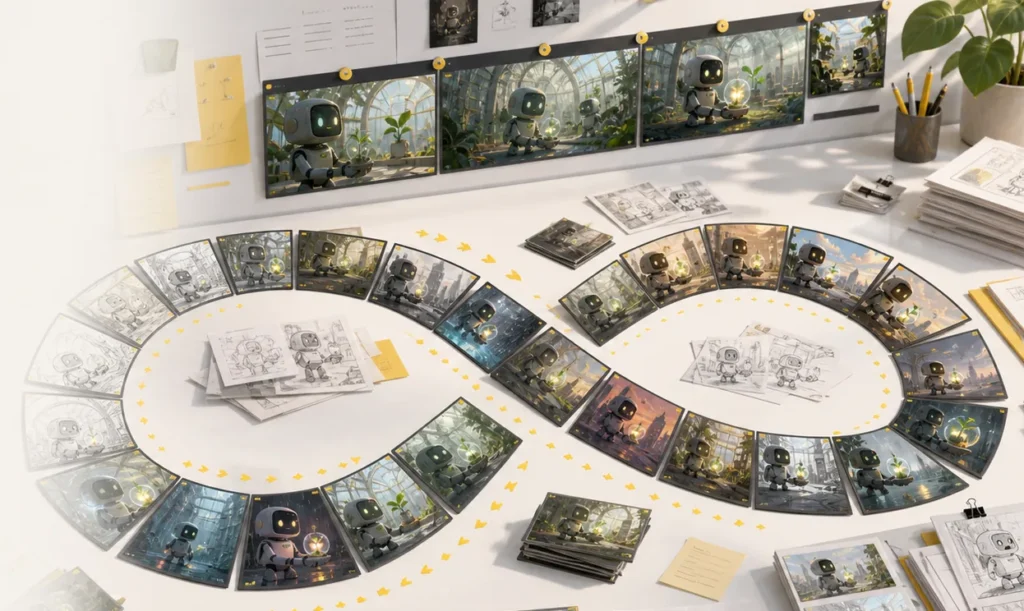
A storyboard is a collection of images representing important moments in a video. Each image communicates what happens in a particular scene and helps production teams understand how the final video should look.
For example, imagine creating a 60-second advertisement for a smartphone. Your storyboard might include:
- Scene 1: A smartphone displayed on a modern desk.
- Scene 2: A person picking up the device.
- Scene 3: A close-up showing the camera features.
- Scene 4: A person taking a photograph.
- Scene 5: The product logo and final advertisement message.
An AI video storyboard generator can help visualize these scenes using written descriptions and image generation technology.
It reduces manual work and helps creators organize their ideas before production begins.
7 Best AI Video Storyboard Generator Tools in 2026
Different platforms provide different approaches to storyboard creation. Some focus on script-to-storyboard workflows, while others offer image generation and visual planning features.
1. Boords – Best for Professional Storyboard Creation
Boords is a storyboard creation platform designed for filmmakers, creative teams, and advertising professionals.
It provides tools for organizing scenes, creating storyboard frames, and presenting visual ideas to clients or production teams.
Key Features:
- Storyboard creation and editing.
- Scene organization.
- Image uploads.
- Script and project planning.
- Team collaboration.
- Presentation and export options.
Why Choose Boords?
Boords is useful for creators who need a structured storyboard workflow. You can organize scenes, add descriptions, and arrange visual frames into a clear sequence.
It is particularly suitable for advertising projects, video production, and animation planning.
Its AI-related capabilities and pricing should be checked against the current plan because not every feature is necessarily available for free.
Website: https://boords.com/
2. Storyboarder – Best for Traditional Storyboard Planning
Storyboarder by Wonder Unit is a free, open-source application designed to help creators draw and organize storyboards.
Although it is not a fully automated AI storyboard generator, it provides useful tools for planning visual stories and can complement AI-generated images.
Key Features:
- Drawing tools.
- Storyboard frame organization.
- Scene sequencing.
- Camera shot planning.
- Image and video workflows.
- Export options.
Why Choose Storyboarder?
Storyboarder is a useful option for people who want more control over their visual planning process.
Creators can generate scene images using AI image tools and then organize those images inside Storyboarder.
This combination offers flexibility for filmmakers and independent creators who prefer a more hands-on workflow.
Website: https://wonderunit.com/storyboarder/
3. Canva – Best for Easy Storyboard Design
Canva is a popular online design platform that offers templates, visual editing tools, and AI-powered creative features.
It helps users create storyboard layouts without requiring advanced graphic design experience.
Key Features:
- Ready-made storyboard templates.
- Drag-and-drop editing.
- AI image generation features.
- Text and visual customization.
- Collaboration tools.
- Export options.
Why Choose Canva?
Canva is suitable for beginners, marketers, and small businesses that want to organize video scenes quickly.
You can create individual frames, add scene descriptions, and arrange them into a visual sequence.
For example, a social media creator can plan a promotional video by placing generated images into a storyboard template.
Some advanced AI features may require a paid subscription.
Website: https://www.canva.com/
4. Katalist AI – Best for AI-Powered Storyboard Workflows
Katalist AI is designed to help creators transform scripts and written concepts into visual storyboards.
It focuses on helping users visualize stories and organize scenes with AI-generated imagery.
Key Features:
- Script-to-storyboard workflows.
- AI-generated scene visuals.
- Character references.
- Scene organization.
- Visual storytelling.
- Storyboard editing.
Why Choose Katalist AI?
Katalist AI is worth exploring if you want a more automated approach to storyboard development.
Instead of creating every visual frame from scratch, you can use your written story as the starting point.
The platform can help organize the narrative into visual scenes, making it useful for advertising, short films, and creative projects.
Website: https://katalist.ai/
5. LTX Studio – Best for AI Film Pre-Production
LTX Studio is an AI-powered creative platform designed to help users develop visual stories and plan video projects.
It supports workflows involving scripts, scenes, characters, and generated visuals.
Key Features:
- Script-based story development.
- AI-generated visual scenes.
- Character creation.
- Scene planning.
- Camera and shot controls.
- Video production workflows.
Why Choose LTX Studio?
LTX Studio is useful for creators who want to move from an initial idea toward a more complete visual production plan.
For example, a filmmaker can develop a short story, create scene concepts, and explore how different shots might appear before generating the final video.
Its features make it worth considering for more ambitious storytelling projects.
Website: https://ltx.studio/
6. Midjourney – Best for High-Quality Storyboard Images
Midjourney is an AI image generation platform known for creating detailed and visually attractive artwork from text prompts.
It is not a dedicated storyboard management platform, but it can help creators produce individual scene illustrations.
Key Features:
- Text-to-image generation.
- Detailed visual styles.
- Character concept artwork.
- Environment generation.
- Image variations.
- Creative visual exploration.
Why Choose Midjourney?
Midjourney is useful when visual quality is a priority.
You can write prompts describing individual scenes and generate images that represent different moments in your video.
For better consistency, maintain detailed character descriptions and use appropriate reference-image features where available.
You may need another tool to organize the generated images into a complete storyboard.
Website: https://www.midjourney.com/
7. Adobe Firefly – Best for Creative Storyboard Visuals
Adobe Firefly provides AI-powered image generation and editing features that can help creators develop visual concepts.
It is particularly useful for producing scene illustrations, backgrounds, objects, and other visual elements needed during pre-production.
Key Features:
- AI image generation.
- Generative image editing.
- Text-to-image workflows.
- Visual customization.
- Creative asset development.
- Adobe ecosystem integration.
Why Choose Adobe Firefly?
Adobe Firefly can help creators develop storyboard images that match their preferred visual style.
For example, you can generate a city background, create a character concept, and prepare different scene illustrations.
These images can then be arranged in a storyboard layout using Canva or another planning application.
Website: https://www.adobe.com/products/firefly.html
Comparison of the Best AI Storyboard Tools
| Tool | Best For | Main Strength |
|---|---|---|
| Boords | Professional storyboards | Scene organization |
| Storyboarder | Traditional planning | Manual control |
| Canva | Beginners | Ready-made templates |
| Katalist AI | Automated storyboards | Script-to-scene workflow |
| LTX Studio | Film pre-production | AI storytelling |
| Midjourney | Visual artwork | Detailed images |
| Adobe Firefly | Creative visuals | AI image editing |
The best choice depends on your project requirements. Some platforms help automate the storyboard process, while others focus on generating high-quality scene images or organizing visual frames.
How to Create a Storyboard Using AI
Creating a storyboard with AI is relatively simple when you follow a structured process.
Step 1: Develop Your Video Idea
Start by deciding what type of video you want to create.
It could be a product advertisement, educational video, short film, YouTube introduction, or animated story.
Write down the main message and identify your target audience.
Step 2: Prepare a Script
Create a short script explaining what happens throughout the video.
For example, a 30-second advertisement might include:
- Opening: Introduce the product.
- Scene 2: Show the main product features.
- Scene 3: Demonstrate how it works.
- Scene 4: Highlight the benefits.
- Ending: Display the brand and call to action.
Step 3: Divide the Script into Scenes
Break your script into smaller sections.
Each section should represent one important visual moment.
This makes it easier for an AI video storyboard generator to understand the structure of your project and create relevant visual frames.
Step 4: Generate Scene Images
Use an AI image generation platform to create visuals for each scene.
Include details such as characters, backgrounds, lighting, camera angles, and actions.
Step 5: Arrange the Storyboard Frames
Place the generated images into a storyboard template.
Add scene numbers, descriptions, dialogue, and camera instructions.
Step 6: Review the Visual Sequence
Check whether the scenes follow a logical order.
Make sure the characters, environments, and visual styles remain consistent throughout the project.
Step 7: Export and Share
Export the storyboard as a PDF or image sequence if supported.
Share it with your production team, clients, or collaborators before starting the actual video production.
Benefits of Using AI Storyboard Generators
AI-powered storyboard creation offers several advantages for creative professionals.
1. Saves Time
Traditional storyboarding can require hours of drawing and organizing visual frames. AI can help generate scene concepts much faster.
2. Reduces Production Costs
Independent filmmakers and small businesses can develop visual plans without immediately hiring professional storyboard artists.
3. Improves Creative Planning
Visual storyboards help creators understand how their ideas will appear before production begins.
4. Easy for Beginners
Many platforms provide simple interfaces, templates, and automated features that do not require advanced drawing skills.
5. Better Team Communication
A visual storyboard helps filmmakers, editors, designers, and clients understand the same creative direction.
6. Faster Advertising Development
Marketing teams can visualize different advertising concepts before investing in video production.
Common Mistakes to Avoid When Creating AI Storyboards
Although AI makes storyboard development easier, certain mistakes can reduce the quality of your project.
- Writing unclear scene descriptions.
- Generating images without a consistent visual style.
- Including too many unnecessary scenes.
- Ignoring camera angles and shot sizes.
- Forgetting important dialogue or actions.
- Using unrelated images in the same sequence.
- Starting video production without reviewing the storyboard.
For better results, use clear prompts and keep your scene descriptions connected to the main story.
Best Uses of AI Video Storyboards
An AI video storyboard generator can support different types of creative projects.
- Short films: Plan scenes, camera angles, and character movements.
- YouTube videos: Organize educational and entertainment content.
- Product advertisements: Visualize promotional campaigns before filming.
- Animation projects: Develop characters and story sequences.
- Social media videos: Plan Instagram Reels, TikTok videos, and YouTube Shorts.
- Corporate presentations: Create visual explanations for business projects.
- Game cinematics: Develop visual sequences for interactive storytelling.
These workflows can help creators turn basic ideas into organized production plans.
Frequently Asked Questions (FAQs)
1. What is the best AI video storyboard generator in 2026?
Katalist AI and LTX Studio are worth exploring for AI-powered storytelling workflows. Boords and Canva are useful for organizing and designing storyboards.
2. Can AI generate a storyboard from a script?
Yes. Some AI platforms can analyze written scripts and help convert them into visual scene sequences.
3. Can I create storyboards for free?
Yes. Some tools offer free plans or free access. Storyboarder is also a free, open-source option for manual storyboard creation.
4. Do I need drawing skills to create an AI storyboard?
No. AI image generation and storyboard templates allow users to create visual plans without professional drawing experience.
5. Can AI storyboards be used for professional filmmaking?
Yes. They can help filmmakers visualize scenes, communicate creative ideas, and organize pre-production activities. However, professional teams should review and refine AI-generated frames.
6. Can I create a storyboard for a YouTube video?
Yes. You can divide your script into scenes and generate images to plan introductions,