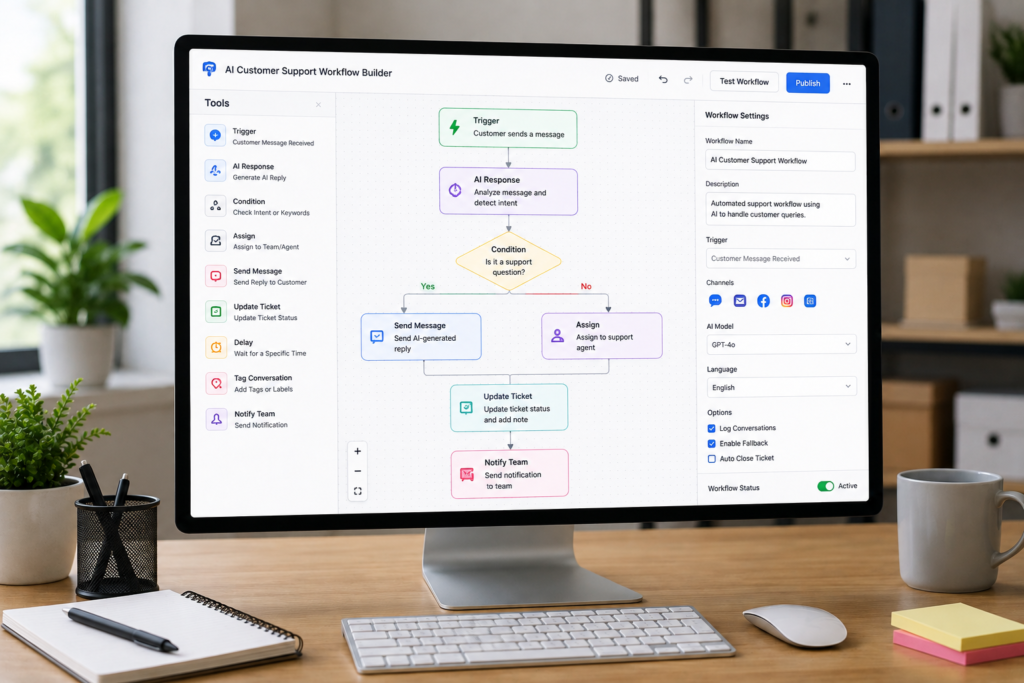
Customer support is one of the most important parts of running a successful business. Customers expect quick responses, helpful information, and solutions to their problems. However, managing hundreds of customer messages, emails, live chats, and support tickets manually can become difficult for growing businesses.
This is where an AI customer support workflow builder becomes useful. These platforms help businesses create automated customer service processes using artificial intelligence, workflow automation, and intelligent chat systems. Instead of handling every customer request manually, businesses can automate repetitive tasks and allow support teams to focus on more complicated problems.
In 2026, AI customer support workflow builder software is becoming increasingly valuable for online stores, SaaS companies, freelancers, startups, and large organizations. These tools can help businesses organize support requests, answer common questions, categorize tickets, and connect different customer service applications.
In this article, we will explore what an AI customer support workflow builder is, how it works, the best tools available, and how businesses can choose the right solution.
What Is an AI Customer Support Workflow Builder?
An AI customer support workflow builder is software that allows businesses to create automated customer service processes using artificial intelligence and visual workflow tools.
These platforms help businesses design workflows that determine what happens when a customer sends a message, submits a support ticket, or asks a question.
For example, when a customer contacts an online store about an order, an automated workflow can identify the customer’s question, collect relevant information, and direct the request to the appropriate support department.
Some advanced systems can also generate responses using AI, summarize conversations, and recommend solutions based on available customer information.
Most workflow builders use visual interfaces, triggers, conditions, and actions. This means users can create many automation processes without advanced programming knowledge.
How Does an AI Customer Support Workflow Builder Work?
An AI customer support workflow builder generally uses several steps to automate customer interactions.
1. Customer Message Collection
The system collects customer messages from supported channels such as email, website chat, social media, and contact forms.
2. AI Message Analysis
Artificial intelligence analyzes incoming messages to understand the customer’s question, identify important information, and recognize the general purpose of the request.
3. Automatic Ticket Classification
The workflow can categorize support tickets based on their subject, urgency, product, or department.
4. Automated Response Generation
For common questions, AI can generate suggested responses using approved business information and available knowledge resources.
5. Ticket Assignment
The system can route customer requests to the correct support agent or department based on predefined conditions.
6. Follow-Up Automation
Businesses can configure reminders, notifications, and follow-up messages to help ensure that customer requests are not forgotten.
7. Performance Monitoring
Support teams can review response times, ticket volumes, customer feedback, and other performance information to improve their workflows.
10 Best AI Customer Support Workflow Builder Tools in 2026
Here are ten platforms worth exploring for creating automated customer support workflows.
1. Zendesk
Best for: Complete customer support management
Zendesk is a customer service platform that helps businesses manage support tickets, customer conversations, and service operations.
Its automation and AI capabilities can help support teams organize incoming requests, categorize conversations, and improve response management.
Businesses can create workflows that assign tickets, send notifications, and automate repetitive support activities.
Key Features:
- AI-assisted customer support.
- Automated ticket routing.
- Customer service workflows.
- Support reporting and analytics.
- Integration with business applications.
Zendesk is particularly useful for businesses that need a structured customer support environment.
2. Intercom
Best for: AI-powered customer conversations
Intercom provides customer communication and support tools designed for online businesses and software companies.
Its AI-powered customer service capabilities can help businesses answer common questions, manage conversations, and automate customer support activities.
Businesses can create workflows that guide customers toward relevant information or connect them with human support agents when necessary.
Key Features:
- AI customer service agents.
- Automated conversation workflows.
- Live chat functionality.
- Customer communication management.
- Support team collaboration.
Intercom can be useful for companies that want to improve website-based customer communication.
3. Freshdesk
Best for: Small and medium-sized businesses
Freshdesk is a customer support platform that helps businesses organize customer requests and manage support tickets.
Its automation features allow teams to create rules for ticket assignment, notifications, prioritization, and other support activities.
Businesses can also explore AI-powered capabilities available through its product offerings.
Key Features:
- Automated ticket management.
- Customer support workflows.
- Ticket prioritization.
- Team collaboration.
- Reporting and analytics.
Freshdesk is worth considering for businesses that want to organize customer service without building a complicated support system.
4. Tidio
Best for: Website chat automation
Tidio provides live chat, chatbot, and customer communication tools for businesses.
Its automation features can help websites respond to common customer questions, collect visitor information, and direct conversations toward the appropriate support channel.
Online stores and small businesses can use Tidio to improve website communication and manage customer inquiries.
Key Features:
- AI chatbot capabilities.
- Website live chat.
- Automated customer conversations.
- Visitor communication.
- E-commerce support integrations.
Tidio is particularly useful for businesses that receive frequent questions from website visitors.
5. HubSpot Service Hub
Best for: Customer relationship management
HubSpot Service Hub provides customer service tools that connect support activities with customer relationship management.
Businesses can manage customer conversations, organize tickets, and create workflows that support their customer service processes.
Its connected CRM environment can help teams understand customer interactions and maintain more organized communication records.
Key Features:
- Customer support ticketing.
- CRM integration.
- Automated workflows.
- Customer feedback tools.
- AI-assisted features.
HubSpot can be useful for businesses that want to connect sales, marketing, and customer support information.
6. Zoho Desk
Best for: Affordable customer service management
Zoho Desk is a help desk platform designed to help businesses manage customer requests across different communication channels.
Its workflow automation capabilities can help support teams assign tickets, manage notifications, and organize customer service activities.
Businesses already using other Zoho products may benefit from its connected business environment.
Key Features:
- Automated ticket assignment.
- Customer support management.
- Workflow rules.
- Knowledge base management.
- Customer service reporting.
Zoho Desk is a useful option for small businesses and growing support teams.
7. Gorgias
Best for: E-commerce customer support
Gorgias is a customer service platform focused on e-commerce businesses.
It helps online stores manage customer conversations and support requests through a centralized system.
Its automation and AI capabilities can support common e-commerce activities, including order-related questions and customer communication.
Key Features:
- E-commerce support workflows.
- Customer conversation management.
- Automated responses.
- Order information access through supported integrations.
- Support team collaboration.
Gorgias can be particularly useful for online retailers that receive frequent questions about orders, shipping, and returns.
8. Zapier
Best for: Connecting customer support applications
Zapier is a no-code automation platform that connects different applications through automated workflows.
Businesses can use it to connect customer support tools with email platforms, spreadsheets, CRM systems, and AI services.
For example, when a new support form is submitted, Zapier can create a record in a connected application and notify the responsible team.
Key Features:
- No-code workflow builder.
- Application integrations.
- Trigger-and-action automation.
- AI service integrations.
- Prebuilt workflow templates.
Zapier is useful for businesses that want to connect existing customer support applications without developing custom software.
9. Make
Best for: Custom visual support workflows
Make is a visual automation platform that allows users to connect applications and build multi-step workflows.
Its drag-and-drop interface makes it possible to create customer support automation using triggers, conditions, and actions.
For example, businesses can create workflows that collect customer messages, process information through supported AI services, and send notifications to support employees.
Key Features:
- Visual workflow builder.
- Multi-step automation.
- AI integrations.
- Conditional workflow logic.
- Application connections.
Make is a good option for businesses that want greater flexibility when designing customer service processes.
10. n8n
Best for: Advanced AI customer support automation
n8n is a workflow automation platform that supports connections between applications, APIs, databases, and AI services.
It provides a visual workflow editor that allows users to create customized automation processes.
Businesses can use it to build AI-powered support assistants, classify incoming messages, summarize customer conversations, and connect different business systems.
Key Features:
- Visual workflow automation.
- AI-powered workflow integrations.
- API connections.
- Custom automation processes.
- Self-hosting options.
n8n is particularly useful for technically confident users who want more control over their automation systems.
Comparison of AI Customer Support Workflow Builder Tools
| Tool | Best Use | Main Strength |
|---|---|---|
| Zendesk | Support management | Ticket automation |
| Intercom | Customer conversations | AI customer service |
| Freshdesk | Business support | Ticket workflows |
| Tidio | Website chat | Chat automation |
| HubSpot | CRM support | Customer information |
| Zoho Desk | Help desk | Workflow rules |
| Gorgias | E-commerce | Order-related support |
| Zapier | App connections | No-code automation |
| Make | Custom workflows | Visual automation |
| n8n | Advanced automation | Workflow flexibility |
Benefits of Using an AI Customer Support Workflow Builder
Businesses can gain several advantages by introducing AI-powered customer support automation.
1. Faster Customer Responses
Automated workflows can identify common customer questions and provide relevant responses using approved information. This can reduce waiting times for customers.
2. Reduced Manual Work
Support employees often perform repetitive activities such as assigning tickets, organizing messages, and sending standard responses. Automation can handle many of these tasks.
3. Better Ticket Organization
An AI customer support workflow builder can help classify incoming requests and direct them to appropriate departments.
4. Improved Customer Experience
Customers can receive faster responses, clearer information, and more organized support experiences.
5. Increased Team Productivity
When repetitive work is automated, employees can spend more time solving complicated customer problems and improving service quality.
6. Easier Business Growth
As businesses receive more customer requests, automated workflows can help support teams manage increasing workloads without immediately expanding every manual process.
How to Choose the Right AI Customer Support Workflow Builder
Choosing the right platform requires understanding your business needs.
Consider these important factors before selecting software:
- Ease of use: Choose a platform with a simple interface and understandable workflow builder.
- AI capabilities: Check whether the tool can classify messages, summarize conversations, or generate responses.
- Integration support: Make sure it connects with your existing CRM, email, website, and customer support applications.
- Customization: Look for flexible triggers, conditions, and workflow actions.
- Security: Review customer data protection, access permissions, and privacy policies.
- Pricing: Compare subscription costs, user limits, automation credits, and AI usage charges.
- Human support: Ensure customers can reach a real support employee when AI cannot resolve their problem.
Testing a platform with a small workflow before implementing it across your entire business is a practical approach.
Frequently Asked Questions (FAQs)
1. What is an AI customer support workflow builder?
An AI customer support workflow builder is software that helps businesses automate customer service processes using artificial intelligence, triggers, conditions, and automated actions.
2. What is the best AI customer support workflow builder in 2026?
Zendesk, Intercom, Freshdesk, Tidio, HubSpot, and Zoho Desk are useful customer service platforms. Zapier, Make, and n8n are suitable for building customized automation workflows.
3. Can I build customer support workflows without coding?
Yes. Many platforms provide visual workflow builders, templates, and drag-and-drop features that allow users to create automated processes without programming.
4. Can AI automatically answer customer questions?
Yes. AI customer support systems can answer common questions using approved business information and connected knowledge sources. Complex or sensitive questions should be transferred to human employees.
5. Is AI customer support automation suitable for small businesses?
Yes. Small businesses can use AI automation to manage website chats, organize customer inquiries, send notifications, and reduce repetitive support activities.
6. Can AI workflow builders connect with CRM software?
Many workflow builders support CRM integrations. These connections can help businesses organize customer information, update records, and manage communication processes.
7. Does AI customer support replace human agents?
No. AI can handle repetitive questions and basic workflows, but human agents remain important for complicated problems, sensitive situations, and decisions requiring judgment.
Conclusion
An AI customer support workflow builder can help businesses improve customer service by automating repetitive tasks, organizing support tickets, and managing customer conversations more efficiently.
Platforms such as Zendesk, Intercom, Freshdesk, Tidio, HubSpot, Zoho Desk, Gorgias, Zapier, Make, and n8n offer different approaches to customer support automation. The best choice depends on your business size, customer communication channels, budget, and automation requirements.
Start with simple workflows, automate frequently repeated support activities, and gradually introduce more advanced AI features. With the right strategy, businesses can save time, improve customer experiences, and build a more efficient support operation in 2026.